
Close Menu
Car Candy Crush – Satisfy Your Sweet Tooth for Cars

    Subscribe to Updates

    Get the latest creative news from FooBar about art, design and business.

    What's Hot

    Geely enters Switzerland with 2 BEVs and 1 plug-in hybrid SUV

    September 21, 2026

    Get a closer look at the iPhone 18 Pro’s mechanical camera

    September 21, 2026

    The First Hurricane Inline-6 Engine Is Over 60 Years Old

    September 21, 2026
    Facebook X (Twitter) Instagram
    Trending
    • Geely enters Switzerland with 2 BEVs and 1 plug-in hybrid SUV
    • Get a closer look at the iPhone 18 Pro’s mechanical camera
    • The First Hurricane Inline-6 Engine Is Over 60 Years Old
    • Federal notices outline new chemical reporting obligations
    • Which Major Chatbot Apps Work With CarPlay?
    • Why the Mini Paceman Is Actually Great Value In 2026
    • VW Anhui sets September 24 debut for ID. UNYX 09 sedan
    • Why Buy a Used Car From a Dealership?
    Car Candy Crush – Satisfy Your Sweet Tooth for Cars
    Monday, September 21
    Facebook X (Twitter) Instagram
    • Home
    • Car Reviews
    • Auto News
    • Maintenance
    • Electric Vehicles
    • Car Tech
    • Classic Cars
    • Buying Guide
    • More
      • Parts & Upgrades
    Car Candy Crush – Satisfy Your Sweet Tooth for Cars
    Home»Car Tech»Which Major Chatbot Apps Work With CarPlay?
    Car Tech

    Which Major Chatbot Apps Work With CarPlay?

    kirklandc008@gmail.comBy kirklandc008@gmail.comSeptember 21, 2026No Comments4 Mins Read
    Facebook Twitter Pinterest LinkedIn Tumblr Email
    Which Major Chatbot Apps Work With CarPlay?
    Share
    Facebook Twitter LinkedIn Pinterest Email

    You can now talk with ChatGPT, Claude and more while you’re on the road.


    PixieMe/Shutterstock

    If you love using AI chatbots like ChatGPT on your phone, you’ll be pleased to know that accessing them in your car is also easy — if you have a car with Apple CarPlay. That’s thanks to an API that arrived with iOS 26.4 allowing developers to bring AI chatbots into CarPlay, with a few already available. You just need to make sure you have the latest versions of their apps installed. 

    For safety while driving, AI tools compatible with CarPlay only work through voice commands. Most of them let you jump back into an existing conversation from another device, at least. Before you continue, make sure your iPhone is running iOS 26.4 or later by visiting Settings > General > Software Update. If an update is available, follow the steps to install it. 

    After that, open the App Store, tap your profile icon at the top-right, choose App Updates, swipe down to refresh, then choose Update All to make sure you have the latest versions of installed AI apps.

    Using AI chatbots in CarPlay


    Filipe Espósito for Engadget

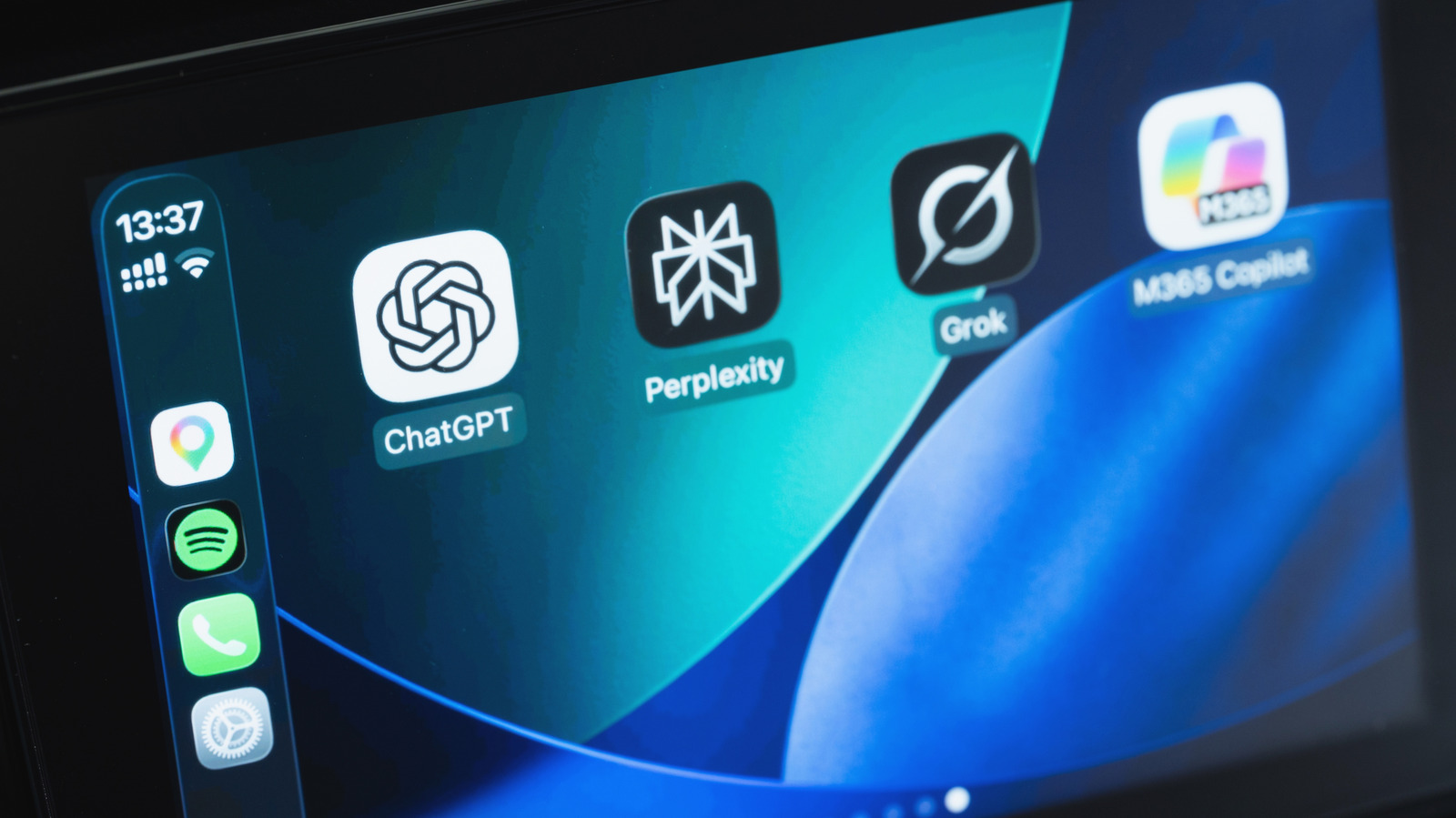
    As the most popular AI bot, it’s no surprise that ChatGPT is CarPlay-ready. If you already have it on your iPhone, you’ll find it on your CarPlay Home Screen. If you don’t have it yet, download ChatGPT for free from the App Store (the same goes for the other apps discussed). With your iPhone connected to your car, tap the ChatGPT icon on CarPlay and select New Voice Chat. Then speak naturally when the app indicates it’s listening.

    If you’re not a fan of ChatGPT, several other options are available. Perplexity is one, with Meta AI and xAI’s Grok also supported. More recently, Anthropic’s Claude has also joined the list of chatbots available on CarPlay. Plus, if you’ve updated your iPhone to iOS 27, Siri AI is available too — though this requires an iPhone 15 Pro or later for Apple Intelligence.

    When you open any of the apps in CarPlay, start a new chat or pick up where you left off before (all with your voice). For Siri AI, try using the “Hey Siri” command if it’s available in your car. You can ask about anything, like suggestions on what to do at your destination. If you’re driving alone, these chatbots can be a fun way to keep you entertained. Of course, remember that AI isn’t perfect and the answers aren’t always correct, so it’s always a good idea to double-check. Also, some conversations can be distracting and are better left for when you’re at home.

    By default, newly-compatible CarPlay apps get added to the end of your home screen, so it’s worth customizing your CarPlay display to make your most-used AI tools easier to reach. On your iPhone, go to Settings > General > CarPlay. Select your car, then choose Apps. Here you can drag them to rearrange and use the red minus icon to remove any you don’t use.

    Why AI chatbots might not work in your car


    DenPhotos/Shutterstock

    AI chatbots in CarPlay have some inconvenient limitations. For one, you can’t access them with a wake word like you can with Siri; you’ll need to open their apps to start talking with them. The bots also can’t control anything in your car or inside other apps.

    Also, how well they understand voice commands depends on the quality of your car’s microphones. If there’s too much noise and/or the microphones are poor, chatbots might not understand what you’re saying. Try closing the windows to reduce outside noise, or use the apps while parked. If you continue to have trouble, try using the chatbot in another vehicle to see if the problem is specific to one car.

    These chatbots shouldn’t be used for navigation, since they don’t have access to your real-time location or a mapping service. You can ask for suggestions on places to visit, but they won’t be able to guide you there. The only chatbot that can do this is Siri AI, since it integrates with Apple Maps. You also need an internet connection to use these apps. A weak signal, or lack of one, is the main they’ll stop working as you drive.

    apps CarPlay chatbot Major Work
    Share. Facebook Twitter Pinterest LinkedIn Tumblr Email
    kirklandc008@gmail.com
    • Website

    Related Posts

    Get a closer look at the iPhone 18 Pro’s mechanical camera

    September 21, 2026

    Trump now says he wants to form an ‘AI Force’

    September 21, 2026

    Which Should You Choose For Your Home?

    September 21, 2026
    Leave A Reply Cancel Reply

    Our Picks
    Stay In Touch
    • Facebook
    • Twitter
    • Pinterest
    • Instagram
    • YouTube
    • Vimeo
    Don't Miss
    Electric Vehicles

    Geely enters Switzerland with 2 BEVs and 1 plug-in hybrid SUV

    By kirklandc008@gmail.comSeptember 21, 20260

    Guests check out the Geely E2 battery electric crossover at the company’s market launch event…

    Get a closer look at the iPhone 18 Pro’s mechanical camera

    September 21, 2026

    The First Hurricane Inline-6 Engine Is Over 60 Years Old

    September 21, 2026

    Federal notices outline new chemical reporting obligations

    September 21, 2026

    Subscribe to Updates

    Get the latest creative news from SmartMag about art & design.

    About Us

    Welcome to Car Candy Crush, where passion for cars meets creativity and style!
    We’re here to celebrate the beauty, power, and excitement of the automotive world — from classic rides to the latest high-tech supercars that make your heart race.

    Latest Post

    Geely enters Switzerland with 2 BEVs and 1 plug-in hybrid SUV

    September 21, 2026

    Get a closer look at the iPhone 18 Pro’s mechanical camera

    September 21, 2026

    The First Hurricane Inline-6 Engine Is Over 60 Years Old

    September 21, 2026
    Recent Posts
    • Geely enters Switzerland with 2 BEVs and 1 plug-in hybrid SUV
    • Get a closer look at the iPhone 18 Pro’s mechanical camera
    • The First Hurricane Inline-6 Engine Is Over 60 Years Old
    • Federal notices outline new chemical reporting obligations
    • Which Major Chatbot Apps Work With CarPlay?
    Facebook X (Twitter) Instagram Pinterest
    • About Us
    • Contact Us
    • Privacy Policy
    • Terms and Conditions
    • Disclaimer
    © 2026 CarCandyCrush. Designed by By Pro.

    Type above and press Enter to search. Press Esc to cancel.