

General Motors is polishing up the software experience in its bestselling trucks in an effort to reduce the amount of dangerous tapping and swiping that’s required to access the most-used controls. It’s also giving Apple CarPlay and Android Auto spiffy new picture-in-picture displays — which is notable given GM’s previously stated hostility to phone mirroring in its electric vehicles.
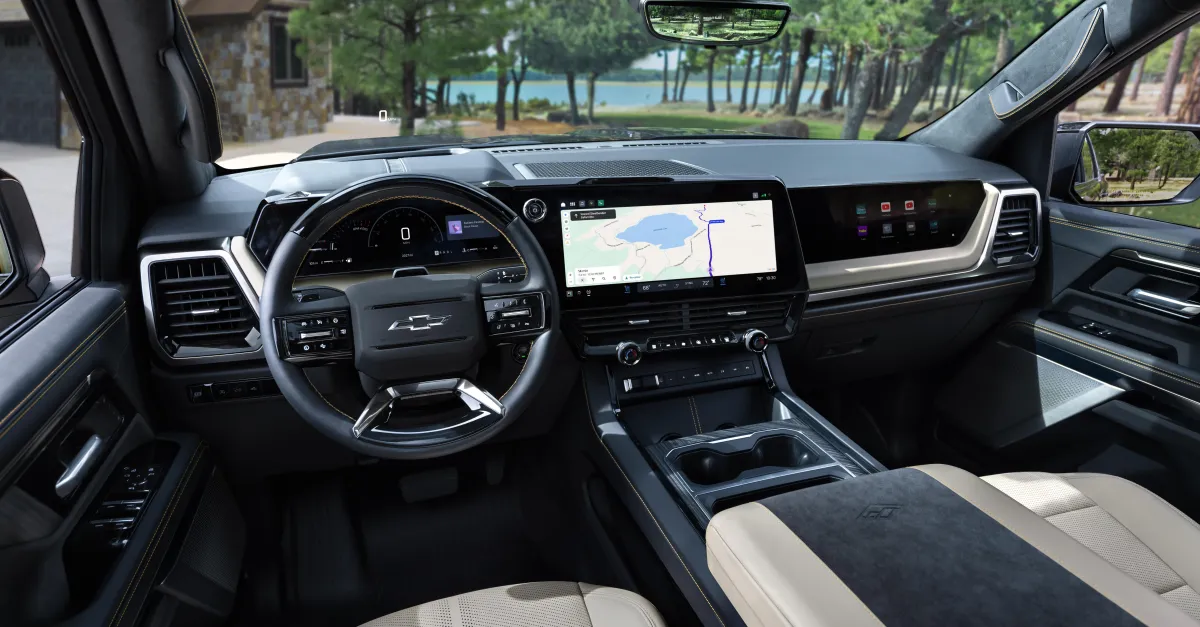
When the next-generation interface makes its debut on the 2027 Chevrolet Silverado 1500 and 2027 GMC Sierra 1500 later this year, vehicle owners will see a number of changes, including slick new graphics for its advanced driver-assist system, animated transitions between displays, and simplified layouts for heavy-duty truck stuff like trailering and off-roading. And they’ll be seeing it all on 60-plus inches of screen real estate — the combined size of instrument cluster, central display, and passenger screen in some of its trucks — that’s designed to enhance but not overwhelm the driving experience.
For GM, larger displays do not necessarily mean more distractions. Instead, the automaker views the additional space as an opportunity to be smarter about how information is presented and to make interactive elements larger, said Colin McCormick, group product manager for Google built-in, projection, and profiles at GM. Larger buttons and bigger tap zones can make the system easier to operate, particularly under difficult driving conditions, he said.
“The buttons can be larger and make it easier to do,” McCormick said. “Living in Michigan, the roads are terrible, so I’m trying to tap on a very small tap zone while hitting a bunch of potholes. These larger displays give you better functionality in that standpoint.”
There are still plenty of physical buttons for key functions like HVAC. But when you want to control the direction of the airflow, a new menu appears as a flyout. Customers have repeatedly professed their love for physical controls, so GM understands that moving key functions onto the screen just because there’s more real estate doesn’t necessarily earn them any goodwill. There are some formerly tangible tools that are now becoming digital only. The oil dipstick, for example, is now a virtual measurement that exists on the truck’s status screen. But the majority of the physical touchpoints remain physical.
Borrowing from the world of smartphone design, GM’s designers added a swipe-down notification interface for quick access to functions such as switching connected devices, entering settings, and privacy controls. Truck owners can disable the vehicle’s microphone directly from this interface, for example. The new interface also distinguishes between settings, which vehicle owners will likely visit once and then rarely ever again, and controls, which they may want to tweak more frequently.
GM wanted to address the complaint that its existing interface can feel disjointed because various functions abruptly take over the entire display, McCormick said. So rather than constantly replacing the entire screen, displays such as the media player can remain visible while an additional queue panel slides in from the side. By using animated transitions, the automaker is hoping to create a more contextual experience when moving between functions.
Lots of truck owners love to haul trailers, so GM put a particular focus on that experience with its new software designs. Trailering information now appears both in the driver information display and in the smaller homescreen card. The trucks include built-in trailer-aware navigation, so once a trailer is connected, the vehicle identifies it, and Google Maps can provide a route that accommodates the trailer. Customers enter the trailer’s dimensions, and those measurements can be carried from one vehicle to another through the customer’s GM account.
But it’s when using Apple CarPlay or Android Auto that Chevy and GMC truck owners may see the most noticeable differences. Again, engineers were hoping to use the added screen real estate “intelligently,” McCormick said. And they didn’t want phone projection to completely take over the truck’s native infotainment, nor did they want to force customers to choose between them.
The solution: picture-in-picture phone mirroring, in which CarPlay and Android Auto occupy a large contextual card rather than taking over the entire screen. When a phone is connected through CarPlay, the phone icon changes into a CarPlay icon; selecting it brings up CarPlay within that large card. Pressing the native home button returns the driver to the split-screen home view. This allows customers to use Apple’s apps while retaining access to native GM functions, like trailering info.
The new layout is even more interesting when you consider GM’s seismic decision in 2023 to drop Apple CarPlay and Android from its EVs. Despite pushback from customers, GM has stood by its decision, arguing that it can deliver a better software experience to its customers without phone mirroring. GM CEO Mary Barra even suggested (in an interview on Decoder) the ban would eventually extend to the automaker’s gas-powered trucks and SUVs — only to walk it back days later.
That’s left GM to tweak CarPlay and Android Auto’s appearance in its Chevy and GMC trucks to enable the native GM-branded software experience to peek through. Phone projection will no longer occupy the entire screen, which McCormick argues was forcing drivers to dangerously switch back and forth when they needed to access their truck’s native controls. In this way, truck owners can choose to project their phone while also accessing key information, like trailering or off-roading details, McCormick said.
“I think we’re landing in a spot where… we don’t have a customer that has to decide, ‘Oh, I’m going to use projection, or, oh, I want to use the native system,’” he said. “That’s our sweet spot.”
The new UI will roll out to new Chevy Silverado and GMC Sierra trucks later this year, but only to new customers. Existing owners will be stuck with the previous-generation experience. The goal was to put the new interface on GM’s “bread-and-butter” trucks rather than first introducing it on lower-volume vehicles, which is more typical for a new experience, McCormick said. GM is so confident in the system that it’s launching it on its bestselling trucks so it can get in front of as many customers as possible.
GM sells close to 900,000 of these trucks a year, meaning the company expects to receive a substantial amount of feedback once the new interface is live and being used by customers. Some aspects of the first version may work extremely well, while others may need to be changed.
”We’ll take that experience, and the OTAs will allow us to get there,” McCormick said.
Follow topics and authors from this story to see more like this in your personalized homepage feed and to receive email updates.
- CarsClose
Cars
Posts from this topic will be added to your daily email digest and your homepage feed.
FollowFollow
See All Cars
- ChevyClose
Chevy
Posts from this topic will be added to your daily email digest and your homepage feed.
FollowFollow
See All Chevy
- GMClose
GM
Posts from this topic will be added to your daily email digest and your homepage feed.
FollowFollow
See All GM
- NewsClose
News
Posts from this topic will be added to your daily email digest and your homepage feed.
FollowFollow
See All News
- TransportationClose
Transportation
Posts from this topic will be added to your daily email digest and your homepage feed.
FollowFollow
See All Transportation
